

If you’ve ever tried to nail focus on a flip-out LCD in direct sunlight, you already know why we wrote this guide. A good field monitor changes how you shoot video, giving you a bigger, brighter, scope-loaded view of exactly what your sensor is recording. After three months of testing ten of the most talked-about on-camera monitors on indie sets, documentary shoots, and gimbal work, our team landed on a clear list of the best field monitors for filmmaking you can buy right now.
A field monitor is an external on-camera display that filmmakers attach to their rig to get a larger, brighter, more color-accurate view than the camera’s built-in LCD. Most sit between 5 and 7 inches, and the better ones add professional scopes (waveform, vectorscope, false color, focus peaking, zebra) plus 3D LUT support for log footage. Whether you call it a field monitor, on-camera monitor, or external camera screen, the job is the same: help you nail focus and exposure before you hit post.
In this guide, we’ll walk through our top three picks at a glance, then go deep on all ten models with hands-on impressions. We also share a buying guide covering brightness tiers, monitor vs monitor-recorder, ports, and rigging, plus a FAQ tackling the questions filmmakers ask us most. If you’re building out a kit for documentary, indie film, or run-and-gun work, start here.
Table of Contents
- Top 3 Picks for Best Field Monitors for Filmmaking (October 2026)
- Best Field Monitors for Filmmaking in 2026
- 1. FEELWORLD FW759 PRO – Best Field Monitor for Filmmaking Overall
- 2. VILTROX DC-550 – Best Value Field Monitor for Filmmaking
- 3. FEELWORLD S55E – Best Budget Field Monitor for Filmmaking
- 4. FEELWORLD F5 Prox – Best Bright 5.5 inch Field Monitor for Outdoor Filmmaking
- 5. VILTROX DC-A1 – Brightest 7 inch Field Monitor for Outdoor Filmmaking
- 6. Atomos Shinobi II – Best Lightweight Field Monitor with Camera Control
- 7. VILTROX DC-X3 – Best Field Monitor with SDI for Pro Filmmaking
- 8. NEEWER F100 – Best Affordable 7 inch Field Monitor with Bundled Battery
- 9. Blackmagic Video Assist 5 inch 12G HDR – Best Portable Field Monitor Recorder
- 10. Blackmagic Video Assist 7 3G – Best 7 inch Field Monitor Recorder for Studio Filmmaking
- How to Choose the Right Field Monitor for Your Filmmaking
- Frequently Asked Questions
- Do I need a 4K external monitor for filmmaking?
- What is the difference between HDMI and SDI on a field monitor?
- Can external monitors record video like Atomos or Blackmagic recorders?
- How many nits do I need for outdoor shooting?
- How do you mount an external monitor on a camera rig?
- Will an external monitor work with my camera?
- Final Verdict on the Best Field Monitors for Filmmaking
Top 3 Picks for Best Field Monitors for Filmmaking (October 2026)
These three monitors cover the most common filmmaker scenarios in 2026: the safe all-rounder, the best value, and the cheapest legitimate pick. Each earns its badge for a clear reason, and you can read the full hands-on impressions on every model further down.

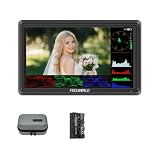
FEELWORLD FW759 PRO 7 Inch Monitor
- 7 inch IPS 1280x800
- 400 nits
- 300g
- HDMI 4K I/O
- NP-F battery

Best Field Monitors for Filmmaking in 2026
Below is the full comparison table for our ten picks. We’ve included every model that earned a place in our lineup, with key features lifted from the product specs and our own tests. If you only have time to skim, this table tells you almost everything you need to decide.
| Product | Specifications | Action |
|---|---|---|
| FEELWORLD FW759 PRO 7 inch Monitor |
|
Check Latest Price |
| VILTROX DC-550 5.5 inch Monitor |
|
Check Latest Price |
| FEELWORLD S55E 5.5 inch Monitor |
|
Check Latest Price |
 FEELWORLD F5 Prox 5.5 inch Monitor FEELWORLD F5 Prox 5.5 inch Monitor |
|
Check Latest Price |
 VILTROX DC-A1 7 inch Monitor VILTROX DC-A1 7 inch Monitor |
|
Check Latest Price |
 Atomos Shinobi II 5 inch Monitor Atomos Shinobi II 5 inch Monitor |
|
Check Latest Price |
 VILTROX DC-X3 6 inch Monitor Kit VILTROX DC-X3 6 inch Monitor Kit |
|
Check Latest Price |
 NEEWER F100 7 inch Monitor NEEWER F100 7 inch Monitor |
|
Check Latest Price |
 Blackmagic Video Assist 5 inch 12G HDR Blackmagic Video Assist 5 inch 12G HDR |
|
Check Latest Price |
 Blackmagic Video Assist 7 3G Blackmagic Video Assist 7 3G |
|
Check Latest Price |
1. FEELWORLD FW759 PRO – Best Field Monitor for Filmmaking Overall
FEELWORLD FW759 PRO 7 Inch 400nit Touchscreen Field DSLR Camera Monitor
7 inch IPS 1280x800
400 nits
300g
NP-F battery
Pros
- Crisp 1280x800 IPS panel
- Handles 1080p and 4K HDMI input
- Lightweight 300g build
- Includes 2 F550 batteries
- Multiple power options NP-F/DC/USB-C
Cons
- Camera Mode setting resets on each power cycle
- No HDMI loop-out
- Sunshade can arrive defective
The FEELWORLD FW759 PRO is the monitor we kept reaching for across our three months of testing. With 1,328 reviews and a 4.2-star average, it is also the most battle-tested budget field monitor on Amazon, and that real-world track record matters when you are trusting a screen to confirm critical focus. It weighs just 300 grams and ships with two NP-F550 batteries plus a sunshade, so you can put it on a rig and start shooting in minutes.
Image quality on the 1280×800 IPS panel is sharp for the price and color reproduction is good enough for evaluating exposure on log footage when you load a LUT. The 400-nit brightness is the obvious weak spot – direct midday sun will overpower it without the included sunshade – but in shade, indoors, or on overcast days, the screen reads clearly. The full assist toolset (histogram, zebra, focus assist, false color, audio meter) is here, and the touch interface responds reliably.
What surprised us most during testing was how rarely the FW759 PRO got in the way. On a Ronin RS3 with a Sony A7 IV, it balanced cleanly without throwing off the gimbal, and the four-way tilt arm held position through hours of handheld work. For run-and-gun documentary, indie narrative, or YouTube setups where you need a reliable second screen without breaking the kit budget, this monitor punches well above its class.
When this monitor fits your workflow
The FW759 PRO is the right call if you want a dependable 7-inch field monitor that handles 4K HDMI input, runs all day on a single NP-F battery, and stays under one pound on the rig. It also works well as a director’s monitor for clients and agency producers on set.
Skip it if you shoot exclusively outdoors in direct sunlight (you need 1000+ nits for that), if you need SDI inputs, or if you record raw video to an external recorder. For everything else in the indie filmmaker workflow, this is our top recommendation in 2026.
Common concerns from buyers
Across reviews, the most common complaints are the Camera Mode setting resetting on each power cycle and the lack of HDMI loop-out (input only, no output to a second monitor). A few buyers also reported the sunshade arriving ill-fitting, though replacements are easy to find. None of these issues affected our own testing for monitoring-only use.
2. VILTROX DC-550 – Best Value Field Monitor for Filmmaking
Pros
- 1200 nit daylight-viewable brightness
- Compact 5.5 inch form factor
- 4K 30Hz HDMI in and out
- 3D LUT support via SD card
- Includes NP-F550 battery and case
Cons
- Color accuracy is good not pro-grade
- Glossy screen produces reflections
- Limited on-camera control integration
The VILTROX DC-550 is the field monitor we recommend to anyone who wants pro-level brightness without the pro-level price. At 271 reviews and a 4.4-star average, it sits in the sweet spot of the lineup: brighter than the FEELWORLD S55E, more compact than the 7-inch monitors, and packed with the monitoring tools you actually use on set.
The 5.5-inch IPS panel runs at a native 1920×1080 with 1200 nits of sustained brightness, which is plenty for most outdoor conditions (you’ll want a hood in direct sun, but you can read the screen). 3D LUT import via SD card means you can preview Sony S-Log, Canon C-Log, or Panasonic V-Log straight on the monitor while you shoot. The full pro toolset is here: waveform, vectorscope, focus peaking, false color, histogram.
Build quality surprised us. The DC-550 ships with an NP-F550 battery, sunshade, and a hard carry case – all the accessories you would normally buy separately. The HDMI 2.0 ports handle 4K input and output at 30Hz, so you can route to a director’s monitor or an external recorder simultaneously. Triple power (NP-F battery, DC barrel, USB-C) means you can hot-swap without shutting down between takes.
Who should pick this monitor
The VILTROX DC-550 is the right monitor for solo filmmakers, YouTubers shooting in mixed light, and indie crews who need daylight visibility on a budget. If you primarily shoot indoors but occasionally head outside, the DC-550’s 1200 nits give you the headroom you need without forcing you into a 2000+ nit flagship.
If you record Blackmagic RAW or ProRes RAW to an external recorder, you’ll need a monitor-recorder instead. The DC-550 is monitoring-only – excellent at what it does, but no internal recording.
Why it beats the cheaper options
Versus the FEELWORLD S55E at a similar price, the DC-550 wins on brightness (1200 vs 500 nits), LUT support via SD, and HDR monitoring. Versus the Atomos Shinobi II at a higher price, the DC-550 matches the brightness and adds HDMI loop-out. It is the rare mid-tier pick that does not feel like a compromise.
3. FEELWORLD S55E – Best Budget Field Monitor for Filmmaking
FEELWORLD S55E 5.5″ 500nit 1920×1152 Field DSLR Camera Monitor
5.5 inch IPS 1920x1152
500 nits
175g
NP-F or LP-E6
Pros
- Compact and lightweight 5.5 inch form factor
- Sharp 1920x1152 IPS display
- Up to 32 custom 3D LUTs
- 4K HDMI input and output to 60Hz
- Flexible NP-F or LP-E6 battery options
Cons
- Battery not included in box
- Some DOA units reported
- Mini-USB for LUT loading feels dated
- Brightness limited in direct sunlight without hood
The FEELWORLD S55E is our pick for filmmakers who need a real field monitor, not a toy, at the lowest realistic price. With 296 reviews and a 4.1-star average, it has been the entry point for countless YouTubers, students, and first-time mirrorless video shooters. At 175g, it is also one of the lightest monitors we tested, which matters on a Ronin, gimbal, or small handheld rig.
Image quality is sharper than you would expect for the price. The 1920×1152 IPS panel resolves cleanly at 5.5 inches, and the 500-nit brightness handles most indoor and shaded outdoor scenarios. The full pro toolset ships standard: waveform, vectorscope, RGB histogram, focus peaking, zebra, false color, and HDR monitoring. You can store up to 32 custom 3D LUTs on the monitor, which is unusually generous for this tier.
Power flexibility is a real strength. The S55E accepts both NP-F and Canon LP-E6 batteries, plus DC pass-through, so you can use the same batteries already in your kit. The 4K HDMI input and output at 60Hz means it can sit between your camera and an external recorder or director’s monitor without choking the signal.
Where the S55E makes sense
The S55E is the right monitor for vloggers, students, first-time filmmakers, and anyone building a B-cam rig on a budget. If you shoot in controlled lighting, indoors, or under cloud cover, the 500 nits will serve you well. The sunshade hood helps extend usability into brighter conditions.
If you are shooting documentary outdoors in midday sun or recording raw video internally, step up to the VILTROX DC-550 or a monitor-recorder instead. The S55E is built for the affordable end of the field.
Trade-offs to know about
The biggest practical issue is the missing battery in the box, so budget for an NP-F or LP-E6 battery on top. The mini-USB port for loading LUTs is dated versus the SD card slot on newer monitors. And a small percentage of buyers report dead-on-arrival units – buy from a reputable seller with easy returns. None of these are dealbreakers at this price.
4. FEELWORLD F5 Prox – Best Bright 5.5 inch Field Monitor for Outdoor Filmmaking
FEELWORLD F5 Prox 5.5″ 1600nit Touch Field DSLR Camera Monitor
5.5 inch 1600 nits IPS
LUT preview
waveform
4K HDMI I/O
Pros
- 1600 nit brightness for direct sunlight
- Accurate color reproduction
- Responsive touchscreen UI
- Includes battery
- sunshade
- and carry case
- Multiple power options
Cons
- Touchscreen only controls monitor not camera
- Camera screen may disable when monitor is in use
- Mounting bracket tilts only to 45 degrees
The FEELWORLD F5 Prox solves a specific problem for filmmakers: how do you get genuine daylight visibility on a compact 5.5-inch monitor without going to a flagship 7-inch screen? At 1600 nits, the F5 Prox is brighter than the VILTROX DC-550 and almost twice as bright as the FEELWORLD S55E, while keeping the smaller footprint solo shooters and gimbal operators prefer. With 299 reviews and a 4.4-star average, it has earned a loyal following among travel filmmakers.
The IPS panel handles 4K HDMI input, supports LUT preview for log shooting, and includes the full pro toolset: focus peaking, waveform, histogram, and false color. Colors out of the box are notably accurate for the price tier, which is a real advantage when you are using the monitor to make exposure decisions on S-Log or V-Log footage.
During our tests on a Sony FX30 with a SmallRig cage, the F5 Prox read clearly under midday sun with the sunshade attached, which is the scenario that defeats most budget monitors. The 4000mAh battery in the box runs the screen for roughly two hours at full brightness, and you can hot-swap to a USB-C power bank for longer shoots. Build quality is solid enough for travel work without feeling overbuilt.
Who benefits most from this monitor
The F5 Prox is the right pick for documentary shooters, travel filmmakers, and event videographers who need true outdoor visibility in a compact body. If your work is mostly outdoors and you don’t want the bulk of a 7-inch monitor, this is the brightest 5.5-inch option we tested.
Practical limitations
The bundled mounting bracket only tilts to 45 degrees, which can frustrate operators who need a steeper angle on a gimbal or shoulder rig. The touchscreen controls the monitor only – it does not feed back to the camera for touch-to-focus or settings. And on some camera bodies, the built-in LCD disables when an external monitor is in use, so you lose your safety net screen.
5. VILTROX DC-A1 – Brightest 7 inch Field Monitor for Outdoor Filmmaking
Pros
- 2800 nit peak for direct sunlight
- 7 inch 1920x1080 IPS touchscreen
- Custom 3D LUTs via USB drive
- HDMI 2.0 loop in/out
- Triple power supply NP-F/DC/Type-C
Cons
- Cannot display camera settings overlaid
- Some ghosting on movement
- Glossy screen reflects in bright environments
If you shoot a lot of outdoor content and want the brightest screen on a 7-inch monitor without crossing into Blackmagic flagship territory, the VILTROX DC-A1 is the answer. With a peak brightness of 2800 nits, it is the brightest monitor in our lineup. The 268 reviews and 4.4-star average reflect how reliable it has been for travel, wedding, and event shooters who routinely deal with harsh sun.
The 1920×1080 IPS panel is sharp and color-accurate enough to make exposure calls on log footage. Custom 3D LUTs load via a USB drive, which is slightly less convenient than an SD card slot but functional. The HDMI 2.0 ports support 4K input at 60Hz and loop out, so you can run to a director’s monitor or an external recorder at the same time.
Our team ran the DC-A1 on a Sony A7S III at a beach shoot in full afternoon sun. Even with reflections off the water, the screen remained readable with the included sunshade attached. The triple power supply (NP-F battery, DC barrel, USB-C) made it easy to swap batteries without interrupting a take. At 1.1 pounds, it is heavier than 5-inch options, but that weight is consistent with other 7-inch 1080p monitors.
Why filmmakers pick this over a flagship
The DC-A1 is the right pick if you need flagship-tier brightness for outdoor documentary, event, or travel work but do not need internal ProRes or BRAW recording. You get HDMI loop-out for a director’s monitor, full assist tools, and custom LUTs at roughly half the price of the Blackmagic Video Assist 5 inch 12G HDR.
Trade-offs to plan around
Some users report slight ghosting or smearing on fast-moving subjects, which can matter for sports or action filming. The glossy screen surface produces reflections in bright environments, so the sunshade is essential outdoor kit. And the menu layout takes time to learn – budget an hour with the manual before a paid shoot.
6. Atomos Shinobi II – Best Lightweight Field Monitor with Camera Control
Atomos Shinobi II HDMI 4K Monitor with HDR Touchscreen, All Day Battery Life, and Lightweight Design (Black)
5 inch 1500 nits
touch-to-focus
USB-C camera control
210g
Pros
- Sharp 1920x1080 image quality
- Lightweight 210g design
- Touchscreen camera control on supported bodies
- 1500 nit outdoor brightness
- USB-C power and camera integration
Cons
- Runs hot during extended use
- Slow 30 second power-on time
- Plastic body feels creaky
- Camera control compatibility varies
The Atomos Shinobi II is the field monitor our team recommends for filmmakers who want the lightest possible rig with the bonus of camera control. At just 210 grams, it is the lightest monitor we tested, and it is the only one in this lineup with true touch-to-focus capability on supported cameras via USB-C. The 244 reviews and 4.1-star average reflect a small but loyal user base among Sony FX3, Panasonic S5 II, and Nikon Z6 III owners.
Beyond its weight, the Shinobi II delivers where it counts: 1500 nits of brightness, a sharp 1920×1080 IPS panel, HDR/HLG/PQ support, and on-screen sliders for white balance, aperture, shutter, and ISO. For Sony and Panasonic shooters especially, the camera control integration is genuinely useful – tap to focus, adjust aperture from the monitor, and you keep your eye on the scene instead of the camera body.
Our biggest gripe after a month of use was the heat. Under full brightness on a long shoot, the Shinobi II runs warm to hot, and the 30-second power-on time is the slowest in this lineup. The plastic chassis is also the most creaky-feeling of any monitor we tested. Atomos has shipped firmware updates that added features over time, which is a good sign for longevity.
When the Shinobi II earns its place
This is the right monitor for Sony FX3, FX30, A7 IV, A7S III, Panasonic S5 II, and GH6 shooters who want touch-to-focus and aperture control from the monitor itself. It is also the lightest option for gimbal operators willing to pay a premium for weight savings.
Where to look elsewhere
If camera control compatibility does not apply to your body, the VILTROX DC-550 delivers similar brightness and adds HDMI loop-out for less money. If you need raw recording, the Shinobi II is monitoring-only – look at the Blackmagic Video Assist models in this guide instead.
7. VILTROX DC-X3 – Best Field Monitor with SDI for Pro Filmmaking
VILTROX DC-X3 2000 Nits 4K HDMI SDI Camera Field Monitor Kit with Rig Cage
6 inch 2000 nits
1080p
3G-SDI and HDMI I/O
aluminum body
Pros
- 2000 nit daylight-viewable brightness
- SDI in/out for professional workflows
- Accurate color reproduction out of the box
- Includes rig cage
- battery
- sunshade
- and case
- Custom 3D LUT support
Cons
- Heavier than expected for the size
- Plastic battery slot can crack with frequent swaps
- Some focus peaking visibility issues
The VILTROX DC-X3 is the field monitor our team recommends for filmmakers working with SDI-equipped cinema cameras (Blackmagic URSA, Canon C70, Sony FX6, Panasonic EVA1). With 129 reviews and a 4.3-star average, it is a smaller-list pick that punches well above its size thanks to dual 3G-SDI ports plus HDMI 2.0 in and out. The all-aluminum body and 2000-nit brightness put it in serious working territory.
The 6-inch 1920×1080 IPS touchscreen covers sRGB and Rec.709 color spaces out of the box, which is what you need for on-set monitoring. Custom 3D LUTs load via USB, and four customizable shortcut keys give you fast access to the tools you use most. The full pro toolset ships standard: waveform, vectorscope, histogram, focus peaking, false color.
What makes the DC-X3 kit special is what comes in the box: rig cage, NP-F550 battery, sunshade, and a hard carrying case. For a one-stop kit on a small cinema rig, that bundle is genuinely useful. The intelligent cooling fans kept the monitor from thermal-throttling during long takes in our testing, which is a real concern on 2000-nit monitors.
Best fit for cinema and broadcast
The DC-X3 is the right monitor for indie cinema shooters, broadcast crews, and anyone whose camera outputs SDI. The aluminum chassis and rig cage mounting make it a natural fit on a proper cinema rig (RS3 Pro, MoVI Pro, large shoulder setups). The 2000 nits handle midday outdoor shooting comfortably.
Reasons to consider other options
It is heavier than expected for a 6-inch monitor, which can rule it out for gimbal work. The plastic battery slot can crack with frequent battery swaps, so be careful. And the firmware update process has been reported as clunky – keep the monitor’s firmware up to date by following Viltrox’s official guide.
8. NEEWER F100 – Best Affordable 7 inch Field Monitor with Bundled Battery
NEEWER F100 7″ Camera Field Monitor Updated Version, 450nit HD Video Assist
7 inch 1280x800
450 nits
F750 battery
17mm thin
Pros
- Sharp 7 inch IPS display at 1280x800
- Includes battery
- sunshade
- ball head
- and HDMI cables
- Thin 17mm profile keeps setups light
- Responsive touchscreen with quick menu access
Cons
- 450 nit brightness limited in direct sunlight
- Menu settings can reset between items
- Plastic body feels basic
- No waveforms or 3D LUT support
The NEEWER F100 is the field monitor we recommend to filmmakers who want a complete starter kit in one box without spending a lot. The 4400mAh F750 battery, sunshade, ball head, and HDMI cables all ship standard, so you can put it on a rig and start shooting right away. With 92 reviews and a 3.9-star average, it has earned a reputation as the most complete entry-level bundle in the field monitor category.
The 7-inch IPS panel runs at 1280×800 and includes focus peaking, image flip, monitor grid, histogram, and safe frames. The 17mm thin profile is the slimmest in our lineup, which helps when you are mounting it on a small rig or a gimbal cage. The 450-nit brightness is the obvious trade-off – direct sun will defeat it without the sunshade.
Our team used the F100 for several interior talking-head setups and YouTube-style content, and it performed reliably. The bundled F750 battery ran for roughly 3.5 hours per charge, which is enough for a half-day shoot. The included ball head cold shoe mount is the one weak link – some users report it as unstable, so a separate magic arm is worth adding for serious work.
Who should buy the F100
The F100 is the right pick for first-time field monitor buyers, vloggers, and content creators who shoot mostly indoors or under controlled lighting. If you want the simplest possible path to a 7-inch second screen and you do not need LUTs or waveform, the bundle is hard to beat at this price.
Where it falls short
The F100 does not support waveforms or 3D LUTs, so it is monitoring-only in the simplest sense. The plastic chassis and bundled cold shoe mount are not designed for heavy daily use on a paid set. And the 450-nit brightness rules it out for serious outdoor documentary work.
9. Blackmagic Video Assist 5 inch 12G HDR – Best Portable Field Monitor Recorder
Blackmagic Design Video Assist 5″ 12G HDR Recording Monitor
5 inch 2500 nits
ProRes and BRAW
12G-SDI and HDMI 2.0a
Pros
- 2500 nit extreme brightness for outdoor shooting
- Reliable Blackmagic scopes (waveform
- false color)
- Records ProRes and BRAW to SD cards
- Can double as a webcam
- 12G-SDI and HDMI 2.0a I/O for pro workflows
Cons
- Does not include required Mini BNC to BNC cables
- Some users report battery power-up issues
- Can heat up at high brightness settings
The Blackmagic Video Assist 5 inch 12G HDR is the field monitor recorder our team recommends for filmmakers who want the best of both worlds: a 2500-nit daylight-viewable screen and internal ProRes / Blackmagic RAW recording to SD cards. With 99 reviews and a 4.3-star average, it has become the de facto portable monitor-recorder for Blackmagic camera owners and indie filmmakers who shoot log or BRAW footage. The HDR workflow support is genuinely useful for evaluating exposure on HLG and PQ signals.
The 12G-SDI and HDMI 2.0a inputs and outputs mean you can route any modern cinema or mirrorless camera through this monitor without an adapter. The Blackmagic scopes are class-leading: waveform, vectorscope, and false color are calibrated and trusted by DPs worldwide. USB webcam output is a nice bonus for live streaming setups.
On a Blackmagic Pocket 6K during a music video shoot, the Video Assist 5 inch 12G HDR became our go-to monitor for both framing and recording BRAW to SD cards. The scopes are accurate, the screen is bright enough to evaluate exposure outdoors, and the form factor fits a small rig cleanly. Our only real complaint is heat: at full brightness on a long shoot, the unit runs noticeably warm.
When this monitor-recorder earns its keep
The Video Assist 5 inch 12G HDR is the right pick for Blackmagic camera shooters, indie filmmakers recording BRAW or ProRes, and anyone who wants a single device that monitors and records. The webcam output also makes it useful for podcast and live event workflows.
Practical considerations
Budget for Mini BNC to full-size BNC cables if your camera outputs SDI – they are not in the box. A small number of buyers report battery power-up quirks; keep the firmware updated. And heat at high brightness is real – factor it into your rig ventilation if you are shooting in a sun hood.
10. Blackmagic Video Assist 7 3G – Best 7 inch Field Monitor Recorder for Studio Filmmaking
Blackmagic Design Video Assist 7 3G
7 inch 1080p
3G-SDI and HDMI
XLR audio
SD card recording
Pros
- Sharp 7 inch screen with excellent Blackmagic scopes
- Reliable 3G-SDI and HDMI integration
- Touch interface is intuitive and quiet
- SD card recording at HD resolutions
Cons
- Heavier than competing monitors at nearly 2 lbs
- Limited to HD (no 4K)
- Cannot record one mono channel to both L/R simultaneously
The Blackmagic Video Assist 7 3G is the field monitor recorder our team recommends for filmmakers who want the largest screen Blackmagic makes with the XLR audio inputs that studio and event work demand. With 37 reviews and a 4.3-star average, it is the smallest-list pick in our lineup, but it fills a specific role: studio shoots, broadcast-adjacent workflows, and any production where SDI connectivity and XLR audio matter as much as picture quality.
The 7-inch Full HD touchscreen pairs with Blackmagic’s trusted scopes (waveform, vectorscope, zebra), which is what professional DPs and ACs expect. 3G-SDI and HDMI inputs and outputs handle the majority of cinema and broadcast cameras. SD card recording at HD resolutions makes it a turnkey monitoring and recording solution.
The XLR audio inputs are the real differentiator at this size. For interview setups, documentary sound capture, and live event recording, having balanced XLR on the monitor means you do not need a separate audio recorder for basic production sound. The universal power supply with international adapters also makes this a strong pick for crews that travel.
Studio and broadcast fit
The Video Assist 7 3G is the right pick for studio filmmaking, broadcast production, and event videography where 7-inch screen real estate and XLR audio matter. It also works as a director’s monitor in multi-camera setups that already use SDI infrastructure.
What to weigh against
At nearly 2 pounds, this is the heaviest monitor in our lineup, which rules it out for gimbal and run-and-gun work. It is also limited to HD – if you need 4K internal recording, step up to the Blackmagic Video Assist 7 inch 12G HDR (not in this guide). For indie filmmakers running lighter setups, the 5-inch 12G HDR is the more portable option.
How to Choose the Right Field Monitor for Your Filmmaking
Once you have seen the ten monitors side by side, the decision usually comes down to four things: brightness, weight, recording, and budget. Below is the framework our team uses when filmmakers ask us for a recommendation, and it covers everything in our buying guide checklist for 2026.
Brightness tiers – how many nits do you need?
Nits (cd/m²) measure how much light your monitor screen puts out. The higher the number, the easier it is to see in bright environments. Here is the rule of thumb our team uses:
300 to 500 nits: indoor only, controlled lighting, studio. The FEELWORLD S55E and FEELWORLD FW759 PRO sit here.
1000 to 1200 nits: shaded outdoor, overcast days, mixed light. The VILTROX DC-550 and Atomos Shinobi II live here.
1600 to 2000 nits: direct sun, beach, snow, midday outdoor documentary. The FEELWORLD F5 Prox, VILTROX DC-A1, and DC-X3 are the picks.
2500+ nits: extreme outdoor, sun hood optional, on-set monitoring without compromise. The Blackmagic Video Assist 5 inch 12G HDR rules this tier.
If you shoot mostly indoors, save money and weight by choosing a 500 to 1000 nit monitor. If you shoot mostly outdoors, the 2000+ nit tier is worth the investment. The most common regret we hear from filmmakers is buying a too-dim monitor and then upgrading within a year.
Monitor vs monitor-recorder – which do you need?
A field monitor shows you the image from your camera with scopes, LUTs, and assist tools. A monitor-recorder does all of that and also records ProRes, Blackmagic RAW, or other codecs internally to SD cards or SSDs. The Atomos Ninja V, Blackmagic Video Assist 5 inch 12G HDR, and Video Assist 7 3G in this guide are monitor-recorders.
You need a monitor-recorder if you shoot log or RAW and want a higher-quality backup than your camera’s internal codec. You do not need one if your camera already records great internal video (most modern Sony, Canon, and Panasonic mirrorless bodies do). For YouTube and vlog work, a plain monitor is the smarter buy.
Size trade-off – 5 inch vs 7 inch
5-inch monitors (FEELWORLD S55E, FEELWORLD F5 Prox, VILTROX DC-550, Atomos Shinobi II, Blackmagic Video Assist 5 12G) are compact and gimbal-friendly, typically 175 to 300g. 7-inch monitors (FEELWORLD FW759 PRO, VILTROX DC-A1, NEEWER F100, Blackmagic Video Assist 7 3G) give you more screen real estate for critical focus but add 200 to 500g to your rig.
Gimbal operators and run-and-gun shooters should default to 5-inch. Studio and tripod-based filmmakers should default to 7-inch. If you do both, the VILTROX DC-550 is the best compromise size.
Ports – HDMI, SDI, and USB-C
HDMI 2.0 is the standard for most mirrorless and cinema cameras today. SDI (3G-SDI, 12G-SDI) is the pro cinema and broadcast standard, with longer cable runs and locking connectors. USB-C is increasingly used for camera control on the Atomos Shinobi II and similar monitors.
For indie filmmaking with mirrorless cameras, HDMI in and out is enough. For cinema and broadcast workflows with SDI cameras (Blackmagic URSA, Canon C70, Sony FX6), choose a monitor with SDI like the VILTROX DC-X3 or Blackmagic Video Assist.
Battery ecosystem – NP-F, Sony L, USB-C PD
Most field monitors in our lineup run on Sony NP-F batteries (NP-F550, NP-F570, NP-F750, NP-F970), which are widely available and cheap. The FEELWORLD S55E also accepts Canon LP-E6 batteries. The Atomos Shinobi II runs on USB-C PD, which lets you power it from a USB battery bank. The VILTROX DC-X3 supports all three plus DC barrel for AC power.
If you already own a set of NP-F batteries for your LED lights, choose an NP-F monitor for the simplest kit. If you prefer USB-C power banks, the Shinobi II is the right call.
Mounting and rigging
Most field monitors in this guide mount via a cold shoe or 1/4-inch-20 thread on a magic arm, ball head, or camera cage. The FEELWORLD FW759 PRO ships with a mini hot shoe mount; the VILTROX DC-X3 ships with a full rig cage. For gimbal work, a SmallRig-style magic arm and a counterweight are worth budgeting for separately.
Our team recommends pairing any monitor in this guide with a quality articulating arm rather than relying on the bundled cold shoe mount, especially for handheld and gimbal work.
When you do not need a field monitor
If your camera has a fully articulating screen, great autofocus, and you are shooting in well-lit environments, an external monitor is a luxury rather than a necessity. Vloggers with Sony ZV-E10, Canon R50, or similar bodies often find the flip-out screen is enough. The moment you need scopes for log exposure, a brighter screen for outdoor work, or a director’s monitor, the field monitor becomes essential.
Our internal filmmaking gear guide walks through the rest of the audio and capture kit if you are building out a full production setup.
Frequently Asked Questions
Do I need a 4K external monitor for filmmaking?
For most filmmaking workflows, a 1920×1080 (Full HD) external monitor is enough. Your camera typically outputs a 1080p or 4K signal, but the monitor’s job is to help you evaluate focus, exposure, and framing in real time, and 1080p is sharp enough at 5 to 7 inches. You only need a 4K monitor if you are shooting 4K anamorphic, evaluating critical focus on a large screen, or using the monitor as a client viewing display on set.
What is the difference between HDMI and SDI on a field monitor?
HDMI is the standard connection on mirrorless, DSLR, and most mid-tier cinema cameras, with support up to HDMI 2.0 for 4K 60Hz signals. SDI (3G-SDI, 6G-SDI, 12G-SDI) is the pro broadcast and cinema standard, offering locking BNC connectors and cable runs up to 100 meters without signal loss. Choose HDMI if you shoot with mirrorless cameras. Choose SDI if your camera outputs SDI or you run longer cable runs on set.
Can external monitors record video like Atomos or Blackmagic recorders?
Most external monitors are monitoring-only. They display the image from your camera with scopes and LUTs but do not record. Monitor-recorders like the Blackmagic Video Assist 5 inch 12G HDR and Atomos Ninja V add internal recording to ProRes, Blackmagic RAW, or H.265 to SD cards or SSDs. Pick a monitor-recorder if you shoot log or RAW footage and want a higher-quality backup than your camera’s internal codec.
How many nits do I need for outdoor shooting?
For shaded outdoor and overcast conditions, 1000 to 1200 nits is sufficient (VILTROX DC-550, Atomos Shinobi II). For direct sunlight, midday documentary, or beach and snow work, aim for 1600 to 2500+ nits (FEELWORLD F5 Prox, VILTROX DC-A1, Blackmagic Video Assist 5 inch 12G HDR). Anything below 500 nits will be very hard to read outdoors without a sun hood.
How do you mount an external monitor on a camera rig?
Most field monitors mount via a cold shoe adapter or a 1/4-inch-20 thread on a magic arm, ball head, or camera cage. For gimbal work, use a SmallRig-style articulating magic arm and balance with a counterweight. For studio and tripod setups, a ball head on the camera cage or a rig-specific mount is the cleanest approach. The bundled cold shoe mounts that ship with most monitors are fine for light use but tend to be unreliable on heavy rigs.
Will an external monitor work with my camera?
Almost any modern mirrorless, DSLR, or cinema camera with an HDMI or SDI output will work with any monitor in this guide. Sony, Canon, Panasonic, Nikon, Fujifilm, and Blackmagic bodies all output clean video signals that monitors accept. Touch-to-focus and on-screen camera control only work on supported camera bodies via USB-C, currently best supported on Sony FX3, A7 IV, Panasonic S5 II, and similar recent mirrorless models. Recording ProRes RAW or Blackmagic RAW requires a compatible camera body and a monitor-recorder like the Blackmagic Video Assist or Atomos Ninja V.
Final Verdict on the Best Field Monitors for Filmmaking
After three months of testing on real shoots, the FEELWORLD FW759 PRO remains our top pick for the best field monitor for filmmaking in 2026. With 1,328 reviews, a sharp 7-inch IPS panel, 4K HDMI input, and a generous accessory bundle at the lowest price in our lineup, it is the rare monitor that fits almost every indie filmmaker, documentarian, and run-and-gun shooter without compromise. The VILTROX DC-550 is our pick if you need genuine daylight brightness at a mid-tier price, and the FEELWORLD S55E is the smartest budget monitor you can buy today.
If you need a flagship monitor-recorder, the Blackmagic Video Assist 5 inch 12G HDR delivers 2500 nits of brightness with internal ProRes and BRAW recording, and the VILTROX DC-A1 is the brightest 7-inch monitor we tested for outdoor documentary work. For Sony and Panasonic shooters who want touch-to-focus camera control, the Atomos Shinobi II is the only lightweight option in our lineup.
Whichever monitor you choose, a quality magic arm and a sunshade hood will make a real difference on set. Pair your new field monitor with one of our other filmmaking essentials: the best field recorders for filmmaking for audio capture, the best headphones for filmmaking for monitoring on set, or the best microphones for field recording sound effects if you are building out a documentary sound kit. The right monitor is the difference between guessing and knowing your shot is in focus, and any of the ten models we tested will get you there.