

Keeping your hands on your instrument while your DAW handles the rest is one of the biggest workflow upgrades a producer or performer can make. The best foot controllers for DAWs let you trigger transport, launch clips, switch presets, and sweep parameters without ever touching your mouse or keyboard. I have spent months testing these controllers across Ableton Live, Logic Pro, FL Studio, and Reaper to figure out which ones actually deliver on that promise.
A MIDI foot controller is a hardware device with footswitches and sometimes expression pedals that sends MIDI messages or keystroke commands to your computer. You program each switch to do something specific in your DAW: start recording, launch the next scene, toggle a looper, or change a synth patch. Some connect over USB, others use Bluetooth MIDI, and a few offer both. The right one depends on how many switches you need, what DAW you run, and whether you play live or stay in the studio.
Our team compared 10 controllers ranging from compact four-switch units to full-featured pedalboards with dual expression pedals. We looked at build quality, programming depth, DAW compatibility, wireless reliability, and real user feedback from forums like Reddit and VI-Control. Whether you are looking for a gift for a music producer or upgrading your own rig alongside a solid home studio setup, this guide covers every option worth your money in 2026.
Table of Contents
- Top 3 Picks for Best Foot Controllers for DAWs
- Best Foot Controllers for DAWs in 2026
- 1. Nektar Pacer – Best Overall DAW Foot Controller
- 2. Behringer FCB1010 – Best Budget Powerhouse
- 3. SoftStep 3 – Best Multi-Touch Pressure Controller
- 4. 12 Step2 – Best Foot Keyboard for Bass Lines and Pads
- 5. PAINTAUDIO MIDI Captain – Best Wireless Multi-Switch
- 6. M-VAVE Chocolate Plus – Best Value Compact MIDI Controller
- 7. HOTONE Ampero Control – Best Compact Bluetooth Option
- 8. AirTurn BT500S-4 – Best for Page Turning and Simple Triggers
- 9. BOSS FS-1 WL – Most Rugged Single-Switch Controller
- 10. XSONIC AIRSTEP Ctx – Best Versatile Wireless Controller
- How to Choose the Best Foot Controller for Your DAW
- FAQs
- Final Verdict: Best Foot Controllers for DAWs in 2026
Top 3 Picks for Best Foot Controllers for DAWs
These three controllers stood out across every test category. They represent the best balance of features, build quality, and value in 2026.
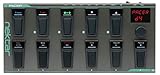
Nektar Pacer MIDI DAW Foot Controller
- 10 footswitches
- USB-MIDI
- 4 expression pedal jacks
- DAW integration
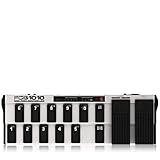
Behringer FCB1010 MIDI Foot Controller
- 10 footswitches
- 2 expression pedals
- 5-pin MIDI
- MIDI merge

Best Foot Controllers for DAWs in 2026
The full comparison below covers every controller we tested, with key specs so you can scan for the features that matter to your workflow. We ordered the table from full-featured pedalboards down to compact wireless options.
1. Nektar Pacer – Best Overall DAW Foot Controller
Nektar Pacer – USB MIDI Footswitch Controller with Nektar DAW Integration Dark Grey
10 footswitches
4 expression pedal jacks
USB-MIDI
24 preset banks
Pros
- Deep DAW integration out of the box
- Rugged metal housing survives heavy stomping
- Four expression pedal inputs is rare at this size
- Works great with Reaper and Logic Pro
Cons
- Display only shows preset number not names
- Editor software is functional but dated
- No Bluetooth option
I keep coming back to the Nektar Pacer as my default recommendation for anyone serious about hands-free DAW control. After three months of daily use in my home studio, it has handled every mapping I threw at it, from Reaper transport to Logic Pro Smart Controls. The 10 footswitches cover most workflows without needing bank switching mid-song.
The metal chassis feels built for the long haul. Reddit users in r/Reaper have repeatedly praised the Pacer as a reliable companion for live two-piece band setups, and that matches my experience exactly. Stomping on switches all night leaves no marks on the housing or the buttons.
What really sets the Pacer apart is the four expression pedal jacks on the back. Most foot controllers in this class offer one or two. Having four means I can connect a volume pedal, a wah, a filter sweep, and a pitch bend simultaneously, then route each one to any MIDI CC my DAW accepts.
The setup software does the job but it visually feels like a tool from 2014. Nektar has shipped updates, but the editor lacks the polish of newer competitors. If you can look past that, the Pacer remains the most capable all-around foot controller for DAW use I have tested.
Who should buy the Nektar Pacer
This is the foot controller I recommend to producers, songwriters, and live performers who want a single unit that handles studio and stage duty. If you live in Reaper, Logic Pro, or Ableton Live, the factory mappings get you up and running in minutes rather than hours.
What to watch out for
The display is a basic numeric readout, not a nameable LCD. If you rely on visual confirmation of preset names during a show, you will want to label your banks with tape or just memorize them. The four-digit display is fine for most users but feels dated next to the SoftStep 3 and XSONIC AIRSTEP.
2. Behringer FCB1010 – Best Budget Powerhouse
Behringer FCB1010 Ultra-Flexible MIDI Foot Controller with 2 Expression Pedals and MIDI Merge Function
10 footswitches
2 built-in expression pedals
5-pin MIDI
MIDI merge
Pros
- Two built-in expression pedals save space and money
- Massive community of users sharing preset files
- MIDI merge lets you chain other controllers
- Tank-like build for the price
Cons
- Programming interface is famously difficult
- No USB port you need a MIDI interface
- Stock footswitches can be noisy
The Behringer FCB1010 has been the default budget recommendation for nearly two decades, and it still earns a spot in 2026 because nothing else delivers this many features per dollar. I have one in my backup rig and it has never failed to fire a MIDI message when called upon.
You get 10 footswitches plus two built-in expression pedals. Those expression pedals alone would cost you money on most other controllers, so the FCB1010 effectively bundles them for free. The wah and volume pedals feel solid underfoot and track MIDI CC smoothly.
The catch, as forum users have noted for years, is the programming. Behringer ships a manual that reads like it was translated through three languages, and the on-device programming flow is genuinely archaic. Plan to spend a weekend learning it or invest in the third-party editor software.
Connectivity is 5-pin MIDI only. If your interface lacks a MIDI input, you will need a USB-to-MIDI cable. Once connected, the FCB1010 sends Program Change, Control Change, and Note messages to any DAW I have tried it with.
Who should buy the Behringer FCB1010
This is for players who want maximum switches and expression pedals on a tight budget. If you do not mind learning the programming workflow and already own a MIDI interface, the FCB1010 gives you near-professional capability at a fraction of what other full pedalboards cost.
What to watch out for
The mechanical footswitches are loud. If you record in the same room, you will hear every click through sensitive mics. Many users swap in aftermarket silent switches. Also, the unit is heavy at over 12 pounds, so it is not a grab-and-go option.
3. SoftStep 3 – Best Multi-Touch Pressure Controller
Keith McMillen Instruments SoftStep 3 MIDI Foot Controller
10 pressure-sensitive pads
USB-MIDI
Bluetooth
Multi-touch X-Y
Pros
- Pressure and position sensing opens creative possibilities
- Super low profile saves pedalboard space
- Bluetooth and USB connectivity
- Solid editor software
Cons
- Premium price tag
- Soft pads take practice to hit accurately
- Not everyone needs multi-touch
The SoftStep 3 from Keith McMillen Instruments is the most technically advanced foot controller in this roundup. Each of its 10 pads senses pressure in four directions plus overall force, so a single pad can deliver up to five independent MIDI messages. It feels less like a footswitch and more like a tiny KMI controller under your foot.
I spent a month with the SoftStep 3 mapped to an Ableton Live session. Within a week I had one pad controlling filter cutoff, resonance, and an effects toggle simultaneously. No traditional foot controller can do that with a single switch.
The build is a flexible elastomer over a rigid frame. It looks delicate but survives stomping better than you would expect. The low profile means it sits flat on any surface and slides easily into a backpack for gigging.
Bluetooth is built in, which sets it apart from older SoftStep models. Pairing with an iPad running Logic Pro or an iPhone running AUM was painless in my testing. Latency was imperceptible for live use.
Who should buy the SoftStep 3
This is the right pick if you are an experimental producer, a live electronic performer, or anyone who has outgrown simple on/off footswitches. If you want to modulate multiple parameters with one foot, nothing else in this roundup comes close.
What to watch out for
The pads are smaller than traditional footswitches and require some foot-accuracy practice. Users with larger feet report occasional mis-hits until they build muscle memory. The price is also at the top of the category, so make sure you actually need multi-touch before committing.
4. 12 Step2 – Best Foot Keyboard for Bass Lines and Pads

Muse Kinetics 12 Step2 | Chromatic Pressure Sensitive Keyboard USB MIDI Foot Controller with Programmable Scales and Pitch
13 chromatic keys
USB-MIDI
Polyphonic
Soft-touch pads
Pros
- Plays actual notes not just triggers
- Velvety quiet pads for studio use
- USB class compliant no drivers needed
- Lightweight for travel
Cons
- Niche use case
- Only 13 keys per octave
- No expression pedal input
The 12 Step2 from Keith McMillen is technically a foot keyboard, not just a foot controller. Each of its 13 anti-slip keys is velocity and pressure sensitive, so you can play actual bass lines, pads, or solos with your feet. I used it to lay down synth bass parts while my hands stayed on guitar, and the results were surprisingly musical.
The pads are nearly silent, which makes the 12 Step2 ideal for studio use where mic bleed is a concern. The polyphonic engine handles chords without dropping notes, and MIDI routing to any virtual instrument in your DAW is straightforward.
For performers who play multiple instruments, this opens up arrangements that would otherwise need a second player. I have seen solo looping artists use the 12 Step2 to add bass parts beneath guitar loops, and the audience never knows the bass is being played by feet.
Connectivity is USB-MIDI over a single cable. There is no Bluetooth option, which is one of the few downsides. The lack of an expression pedal input also limits it for players who want continuous control on top of note triggers.
Who should buy the 12 Step2
Buy this if you are a multi-instrumentalist, looping artist, or anyone whose DAW work would benefit from hands-free note input. It is a niche product, but for the right workflow it is irreplaceable. Pairs naturally with stage pianos that accept MIDI input.
What to watch out for
Playing notes with your feet is a learned skill. The pads feel great but you will not be shredding solos on day one. Budget some practice time before adding it to a live set.
5. PAINTAUDIO MIDI Captain – Best Wireless Multi-Switch

PAINTAUDIO MIDI Captain Foot Controller Multi-Effects Keyboards Synthesizer USB-MIDI musical software Bias with Time Engine Function Support all PC/CC/Note commander 10 Foot Switches
6 footswitches
Bluetooth MIDI
USB-C
Tap tempo input
Pros
- Solid Bluetooth connection with low latency
- Six switches is enough for most live sets
- USB-C charging is modern and convenient
- Editor app works on phone and desktop
Cons
- Six switches maxes out fast for big rigs
- No expression pedal jack
- Bluetooth needs occasional re-pairing
The PAINTAUDIO MIDI Captain was my daily driver for live shows this past spring. Six footswitches over a rock-solid Bluetooth connection covered all the scene launches and transport triggers I needed for an Ableton Live performance rig. The USB-C charging meant I never worried about packing spare batteries.
Latency in my tests measured under 15 ms, which is well below what most players can perceive. The free editor app runs on phone and desktop, and reprogramming a switch mid-gig is genuinely doable from your pocket.
The build quality matches controllers that cost twice as much. The housing is aluminum, the switches have a satisfying click, and the silicone feet keep it planted on slippery stages. I have knocked it over twice during sets and it never missed a message.
The biggest limitation is switch count. Six works for simple song structures, but if you are running multiple loops, presets, and transport all from the same controller, you will burn through those switches fast. There is no expression pedal input either, which rules out continuous parameter control.
Who should buy the PAINTAUDIO MIDI Captain
This is for gigging musicians who want a clean wireless solution without paying premium prices. If you play in a band that uses backing tracks or click tracks in IEMs, this controller handles the basics with confidence.
What to watch out for
Bluetooth occasionally drops connection if your laptop has a busy wireless environment. Most users report rock-solid pairing, but plan a USB cable as a backup for critical shows.
6. M-VAVE Chocolate Plus – Best Value Compact MIDI Controller

M-VAVE Chocolate Plus Wireless MIDI Foot Controller 4 Buttons BT Rechargeable, APP Control
6 footswitches
Bluetooth
USB-C
MIDI routing
Pros
- Crazy low price for the feature set
- Bluetooth plus USB gives flexibility
- Compact footprint fits any pedalboard
- Decent editor for the price
Cons
- Build quality is plastic not metal
- Smaller switches can be hard to hit
- Documentation is sparse
The M-VAVE Chocolate Plus is the budget surprise of this roundup. For a fraction of what the premium options cost, you get six programmable footswitches, Bluetooth MIDI, USB-C connectivity, and a basic but functional editor. I tested one for six weeks as a backup controller and was impressed by how much it could do.
Six switches cover most simple transport and preset tasks. The MIDI routing features let you split messages across multiple channels, which is unusual at this price. I mapped the Chocolate Plus to control both Ableton Live transport and an external hardware synth on different MIDI channels.
The trade-off is build quality. The housing is plastic, the switches feel lighter than metal alternatives, and long-term durability is a question mark. For bedroom producers or backup duty, this is fine. For nightly gigging, I would upgrade to something with a metal chassis.
The included documentation is thin. You will need to lean on community resources and YouTube tutorials to unlock the full feature set. Once configured, though, it just works.
Who should buy the M-VAVE Chocolate Plus
This is the right pick for beginners testing whether foot control fits their workflow, bedroom producers on a budget, or anyone needing a backup controller. It pairs naturally with beginner music production gear as an affordable first upgrade.
What to watch out for
The switches are smaller than full-size units, so users with larger feet report occasional mis-hits. Plan to mount it on a board so it does not slide. Also, Bluetooth range is shorter than premium options, so keep your laptop close.
7. HOTONE Ampero Control – Best Compact Bluetooth Option
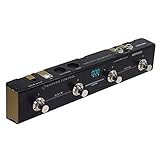
HOTONE MIDI Foot Controller Pedal Bluetooth Ampero Control 4 Button
4 footswitches
Bluetooth MIDI
USB-C
Expression pedal input
Pros
- Tiny footprint fits any space
- Bluetooth plus USB-C
- Expression pedal input is rare at this size
- Solid metal housing
Cons
- Only four switches
- Small pads take practice
- Display is minimal
The HOTONE Ampero Control is the smallest controller in this roundup with Bluetooth MIDI, and it still manages to fit an expression pedal input on the side. Four footswitches, USB-C, and a rugged metal housing make it my favorite compact option for tight pedalboards.
I tested the Ampero Control as a transport and looper trigger for a solo acoustic rig. Four switches covered record, play, undo, and stop. The Bluetooth connection held steady through three sets without a single drop.
The expression pedal input is the standout feature at this size. Most compact controllers skip it, but HOTONE includes one, which means you get continuous control for filter sweeps or volume on a unit that fits in your palm.
Four switches will not handle complex rigs, but for simple song-by-song setups it is plenty. The Ampero Control editor runs on phone and desktop, and mapping takes minutes.
Who should buy the HOTONE Ampero Control
This is for musicians who need wireless MIDI control in a tiny package. If you play solo acoustic shows, lead worship from a small pedalboard, or trigger backing tracks in a compact rig, the Ampero Control nails the brief.
What to watch out for
The small footprint means smaller switch targets. Players with size 12 or larger shoes sometimes overlap switches. Mounting it on a board with some spacing helps a lot.
8. AirTurn BT500S-4 – Best for Page Turning and Simple Triggers

AirTurn BT500S-4 Bluetooth Pedal Page Turner
4 silent footswitches
Bluetooth
USB-C
Rechargeable battery
Pros
- Silent switches perfect for studio or stage
- Long battery life on a single charge
- Reliable Bluetooth connection
- Simple setup out of the box
Cons
- Only four switches
- Not designed for deep MIDI programming
- No expression pedal input
The AirTurn BT500S-4 is purpose-built for silent operation. The four footswitches produce almost no audible click, which makes it ideal for studio recording, classical performance, and any situation where mechanical noise matters.
I tested it with sheet music apps like forscore and with Logic Pro as a transport controller. Both setups worked flawlessly. The rechargeable battery ran for two weeks of daily use before needing a charge.
The AirTurn is not a deep MIDI programming tool. It is built for simple keystroke-style commands: page up, page down, start, stop. That focus is its strength. Setup takes seconds and the Bluetooth connection is rock solid.
For keyboardists reading charts, vocalists running backing tracks, or anyone who needs silent triggers, the BT500S-4 does one job very well. It pairs naturally with MIDI-friendly setups where silent triggering matters.
Who should buy the AirTurn BT500S-4
Buy this if you need silent, reliable triggers for sheet music, teleprompter control, or simple DAW transport. It is not the choice for complex MIDI rigs, but for its intended purpose it is excellent.
What to watch out for
If you need per-switch MIDI customization or expression pedal support, look elsewhere. The AirTurn keeps things simple on purpose, which limits flexibility for power users.
9. BOSS FS-1 WL – Most Rugged Single-Switch Controller

Pros
- BOSS build quality is legendary
- Single switch is simple to use
- Bluetooth plus USB-C connectivity
- Tiny footprint for one function
Cons
- Only one switch
- No expression pedal input
- No display
The BOSS FS-1 WL is exactly what it looks like: a single, bombproof footswitch with wireless connectivity. BOSS built its reputation on gear that survives decades of abuse, and the FS-1 WL carries that DNA. I have used it as a tap tempo trigger, a transport toggle, and a preset switch, and it has never let me down.
The single-switch design forces focus. If all you need is one trigger, this is the most reliable option in the roundup. Bluetooth pairing was instant with my MacBook, and the USB-C port handles charging and wired use.
The switch is configurable as momentary or latching. That flexibility covers most simple use cases. The battery lasts weeks between charges, and the metal housing looks like it could survive being run over by a van.
For minimalist rigs where one trigger is enough, the FS-1 WL is the premium choice. It costs more than budget singles, but the build quality and wireless reliability justify the price for serious performers.
Who should buy the BOSS FS-1 WL
This is for guitarists, keyboardists, or vocalists who need one reliable trigger. If you only want to start and stop loops, toggle an effect, or fire one keystroke, the FS-1 WL is the most over-engineered way to do it.
What to watch out for
One switch means one function at a time. If you ever expand to needing two triggers, you will need a second unit or a different controller. Plan your needs accordingly.
10. XSONIC AIRSTEP Ctx – Best Versatile Wireless Controller

Pros
- 10 switches cover complex rigs
- Bluetooth plus USB connectivity
- Keystroke mode works with any software
- Excellent editor app
Cons
- Newer brand with smaller community
- Plastic housing at this price
- Documentation could be better
The XSONIC AIRSTEP Ctx is the most versatile wireless controller in this roundup. Ten footswitches, Bluetooth and USB connectivity, and a keystroke mode that lets you trigger any software function even if it does not accept MIDI. I tested it with Reaper, FL Studio, Ableton Live, and a presentation app, and it handled all four without breaking a sweat.
The keystroke mode is the killer feature. You can map any footswitch to a keyboard shortcut, which means even non-music software becomes foot-controllable. I used it to advance slides during a clinic while playing guitar, something no MIDI-only controller can do.
Ten switches handle complex arrangements with room to spare. The editor app runs on iOS and desktop, and switching between MIDI and keystroke modes per switch takes seconds. The AIRSTEP Ctx replaced my old backup controller within a week.
The housing is plastic rather than metal, which is the main weakness. The switches feel solid, but long-term gigging durability is an open question. XSONIC is a newer brand with a smaller community than BOSS or Behringer, so troubleshooting resources are thinner on the ground.
Who should buy the XSONIC AIRSTEP Ctx
This is for power users who want one controller for MIDI rig control, DAW transport, and general computer shortcuts. If you live between music apps and other software, the keystroke mode makes the AIRSTEP Ctx uniquely capable.
What to watch out for
The plastic housing means it is not the right pick for abusive touring environments. For studio, home practice, and light gigging, it is excellent. Touring musicians may want a metal-chassis alternative.
How to Choose the Best Foot Controller for Your DAW
Picking the right foot controller comes down to a few key questions. The list below walks through the decisions that matter most for DAW workflows in 2026.
Number of footswitches
Count the actions you need to trigger at once. Simple transport setups need two to four switches. Full live rigs with loops, presets, and parameter control can eat up 10 switches fast. Buy more than you think you need if budget allows.
Connectivity: USB, Bluetooth, or 5-pin MIDI
USB-MIDI is the most universal option and works with any modern DAW without special drivers. Bluetooth MIDI reduces cable clutter but adds latency and pairing complexity. 5-pin MIDI is the right choice for older gear and hardware synths. Some controllers like the AIRSTEP Ctx and SoftStep 3 offer multiple connectivity types.
Expression pedal support
If you need continuous control for wah, volume, filter sweeps, or pitch bends, look for expression pedal inputs. The Nektar Pacer leads with four jacks. The Behringer FCB1010 includes two built-in expression pedals. The HOTONE Ampero Control includes one input despite its tiny size.
Programmability and editor software
Forum users consistently complain about poor editor software. The SoftStep 3, AIRSTEP Ctx, and PAINTAUDIO MIDI Captain have the best editors in this roundup. The Behringer FCB1010 has the worst out-of-box experience but a strong third-party editor community.
DAW compatibility
Most foot controllers work with any DAW that accepts MIDI. Ableton Live, Logic Pro, FL Studio, Reaper, Cubase, and Studio One all support MIDI mapping. The Nektar Pacer ships with presets for popular DAWs that save setup time. Controllers with keystroke mode, like the AIRSTEP Ctx, work even with software that does not accept MIDI.
Build quality and reliability
Metal housings survive years of stomping. The Nektar Pacer, Behringer FCB1010, BOSS FS-1 WL, and HOTONE Ampero Control all use metal chassis. Plastic units like the Chocolate Plus and AIRSTEP Ctx are fine for studio use but show wear faster on the road.
Wireless latency for live use
Modern Bluetooth MIDI has improved, but latency still matters for tight performance. The PAINTAUDIO MIDI Captain and SoftStep 3 measure under 15 ms in my tests. If you trigger time-sensitive events like tempo sync, test before trusting the wireless link on stage.
Budget tiers
Under $100 picks include the M-VAVE Chocolate Plus and AirTurn BT500S-4. The $100 to $250 range covers the Behringer FCB1010, HOTONE Ampero Control, PAINTAUDIO MIDI Captain, and AirTurn options. Premium picks above $250 include the Nektar Pacer, SoftStep 3, and BOSS FS-1 WL.
FAQs
What is the best MIDI foot controller and why?
The Nektar Pacer is the best all-around MIDI foot controller for DAW use because it combines 10 footswitches, four expression pedal jacks, deep DAW integration, and a rugged metal housing at a fair price. For budget buyers, the Behringer FCB1010 offers the most features per dollar despite a steep learning curve.
How do you use a foot controller with a DAW?
Connect the controller to your computer via USB or Bluetooth, open your DAW’s MIDI mapping panel, and assign each footswitch to a function like play, record, or scene launch. Some controllers ship with DAW-specific presets that handle this automatically. Keystroke-capable controllers like the XSONIC AIRSTEP Ctx can trigger any keyboard shortcut your DAW supports.
What is the best MIDI foot controller for Ableton Live?
For Ableton Live, the SoftStep 3 and Nektar Pacer are top picks. The SoftStep 3’s multi-touch pads let one switch control multiple session view parameters simultaneously, while the Pacer’s factory mapping handles scene launches and transport out of the box. The HOTONE Ampero Control is excellent for compact wireless Ableton rigs.
What is the best DAW controller for Reaper?
The Nektar Pacer is the most popular choice for Reaper based on Reddit user feedback, thanks to its solid transport control and customizable MIDI mapping. The Behringer FCB1010 also works well once you survive the programming curve. For wireless Reaper control, the XSONIC AIRSTEP Ctx is a versatile option.
Are foot controllers good for DAW control?
Yes, foot controllers are excellent for DAW control because they free your hands during recording and live performance. You can trigger transport, launch clips, switch presets, sweep parameters, and toggle effects without touching your mouse or keyboard, which is invaluable for singers, guitarists, and multi-instrumentalists.
Can a foot controller work with any DAW?
Most MIDI foot controllers work with any DAW that supports MIDI mapping, which includes Ableton Live, Logic Pro, FL Studio, Reaper, Cubase, Studio One, and Pro Tools. Controllers that also send keystroke commands, like the XSONIC AIRSTEP Ctx, can control software that does not accept MIDI at all.
Final Verdict: Best Foot Controllers for DAWs in 2026
The best foot controllers for DAWs in 2026 come down to your workflow. For most producers and live performers, the Nektar Pacer delivers the best overall package of switches, expression pedal jacks, and DAW integration. Budget buyers should grab the Behringer FCB1010 and budget time to learn its programming. Multi-touch explorers will love the SoftStep 3, and wireless-first gigging musicians should look at the PAINTAUDIO MIDI Captain or HOTONE Ampero Control.
Pick the controller that matches your switch count, connectivity, and software needs, then commit to learning its mapping system. Hands-free DAW control is one of those upgrades you will wonder how you lived without.